Skip to content
Animal HospitalShift Desk
Interactive second-screen tool

Animal Hospital Shift Assistant

Work through the same five checks for every patient: window, photo, paperwork, CCTV, and behavior. Your progress stays saved in this browser.

Checklist interpretation

How to read the Animal Hospital Shift Assistant result

The Shift Assistant records what you observed; it does not inspect Roblox or decide for the team. Complete the five checks in order, leave unseen evidence open, and treat the risk summary as a prompt for another look rather than an automatic admission or rejection.

01

Use normal, mismatch, and open correctly

Mark normal only when you actually observed the requested feature. Mark mismatch when a visible detail conflicts with the file or expected patient. Leave the item open when the view was missing, too quick, or unclear. Open is not a weak answer; it preserves uncertainty instead of turning it into false confidence.

The strongest documented categories are the window, photo, and CCTV. Paperwork and behavior slow the process down enough to notice contradictions, but they should support rather than erase visual evidence. If one category conflicts with the rest, repeat the related observation before making the final call.

02

Interpret the risk summary cautiously

A low observed risk means the five recorded checks are clear, not that the tool guarantees safety. A review result means at least one mismatch deserves confirmation. A high-risk result means several checks disagree and the routine admission flow should pause while the team follows the current in-game procedure.

Do not chase a preferred result by changing answers after seeing the summary. Update a check only when you obtained new evidence. If teammates disagree, compare the specific observation instead of arguing about the color or label shown by the tool.

03

Reset and save at the right time

Saved browser state helps when a patient check is interrupted, but every new patient needs a clean checklist. Reset after the team completes the decision and before the next file becomes active. Otherwise an old mismatch can contaminate the next result and create a false escalation.

If the page is refreshed, verify the patient file before continuing from saved progress. On shared devices, tell teammates when you reset or reopen the tool. The checklist is most reliable when everyone knows which patient the saved state belongs to.

04

Use the tool with a team

Let one player own the checklist while teammates call out observations. The recorder should repeat each result before marking it, especially when several voices speak at once. This creates a short audit trail and reduces accidental clicks.

If control passes to another player, state the current patient and unfinished checks. Do not assume saved browser state explains the context by itself.

Patient file 01

Five-point shift check

  1. 1

    Window appearance

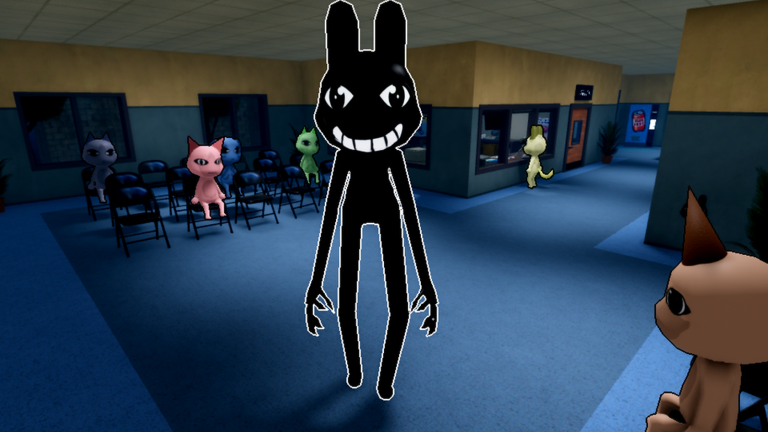
    Do the face, eyes, teeth, ears, and movement look normal?

  2. 2

    Photo comparison

    Does the patient match the provided photo and file?

  3. 3

    Paperwork and complaint

    Do the name, symptom, and requested treatment make sense together?

  4. 4

    CCTV review

    Does the waiting-room camera show a normal body and behavior?

  5. 5

    Audio and behavior

    Is the speech, reaction, and timing consistent with the patient?

Using the checklist

Use the checklist. Make the final call yourself.

If you have not seen enough, leave the check open. One odd detail means look again; several mismatches mean stop and review.

Run the checks in order

Start with the patient at the window, then compare the photo and paperwork before opening CCTV.

Mark only what you observed

Leave a check open when the game has not shown you enough evidence.

Re-check one mismatch

A single warning can deserve another look. Multiple mismatches raise the risk.

Reset for every patient

Saved state is useful during a shift, but a new patient needs a clean file.

We use optional Google Analytics only if you allow it. Future ads may use third-party cookies or similar identifiers; details are listed in the Privacy Policy.